MenuTalk
The AI assistant that talks to your customers
Customers call. AI takes the order.
A customer calls your restaurant and simply says what they want. MenuTalk talks to them like a good waiter: it knows your menu, asks about sizes and extras, checks the address, gives the price and the time, and sends the order straight to the kitchen screen. Your staff don't have to pick up the phone.
We're looking for the first pilot restaurants.
Call to the restaurant
AI assistant speaking · 01:24
Hello, this is the restaurant's AI assistant. I can take your order, delivery is about 40 minutes. What would you like?
A large margherita and a tomato soup to 5 Long Street.
Large margherita and tomato soup, delivery €2, total €18. Shall I confirm?
Yes, please.
Order #42 sent to the kitchen
AI: Large margherita and tomato soup, delivery €2, total €18. Shall I confirm?
Customer: Yes, please.
How it works
From phone call to plate in four steps
- 1
The customer calls
Your restaurant's number, as always. The assistant answers right away, even when everyone's busy.
- 2
They talk to the assistant
They say what they want. The assistant answers aloud and can be interrupted like a person.
- 3
The kitchen sees the order
Number, address, extras and notes appear on the kitchen screen right away.
- 4
Delivery or pickup
Couriers get the order and the address in their app, and the owner sees everything live.
See it
A conversation becomes an order
No mockups: this is MenuTalk running. The restaurant, orders and conversations in the screenshots are sample data, and we match the colors and logo to your venue. Screens shown in Polish.
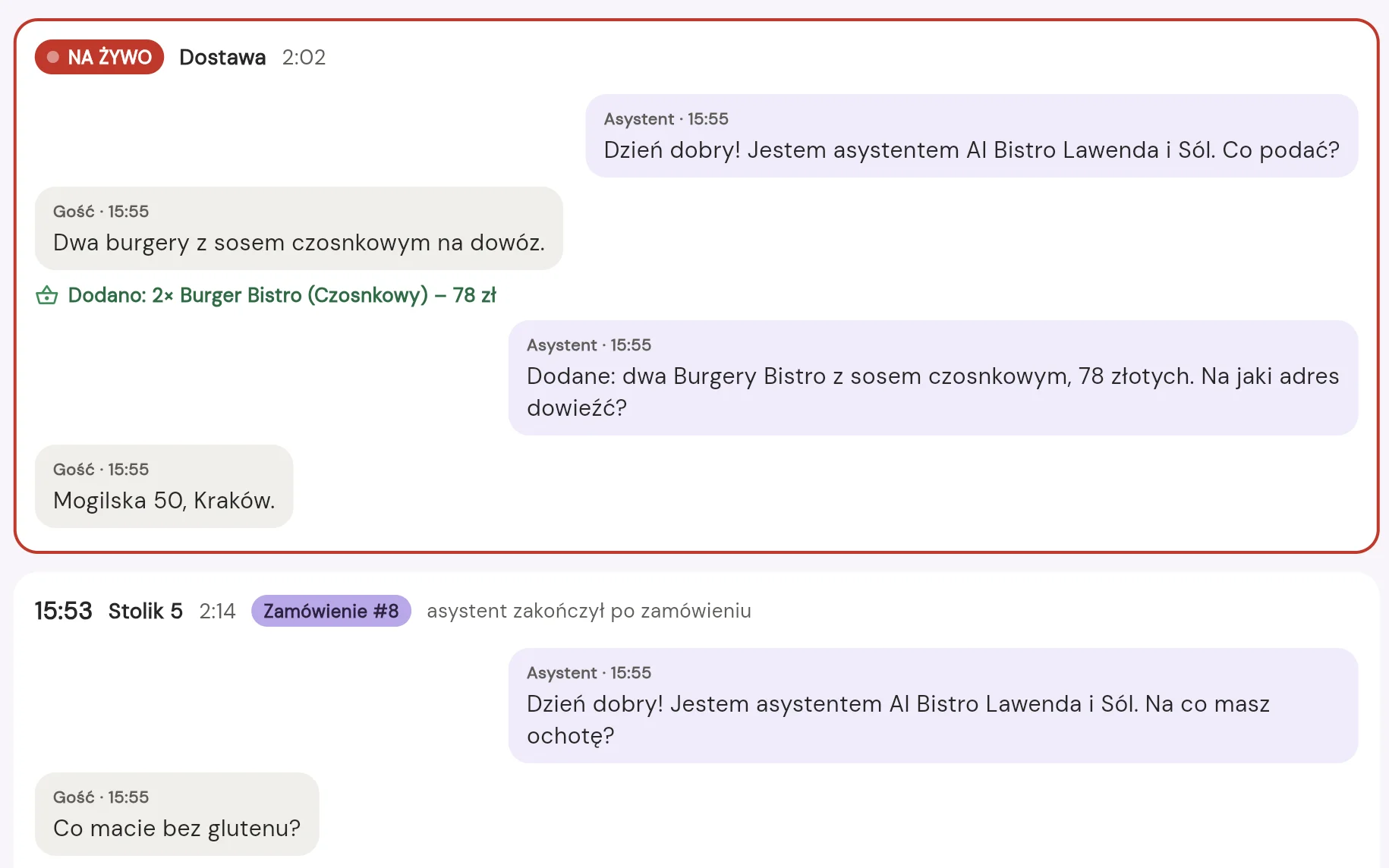
It hears, understands, adds to the order
The owner reads every conversation as it happens, along with what the assistant adds to the order.
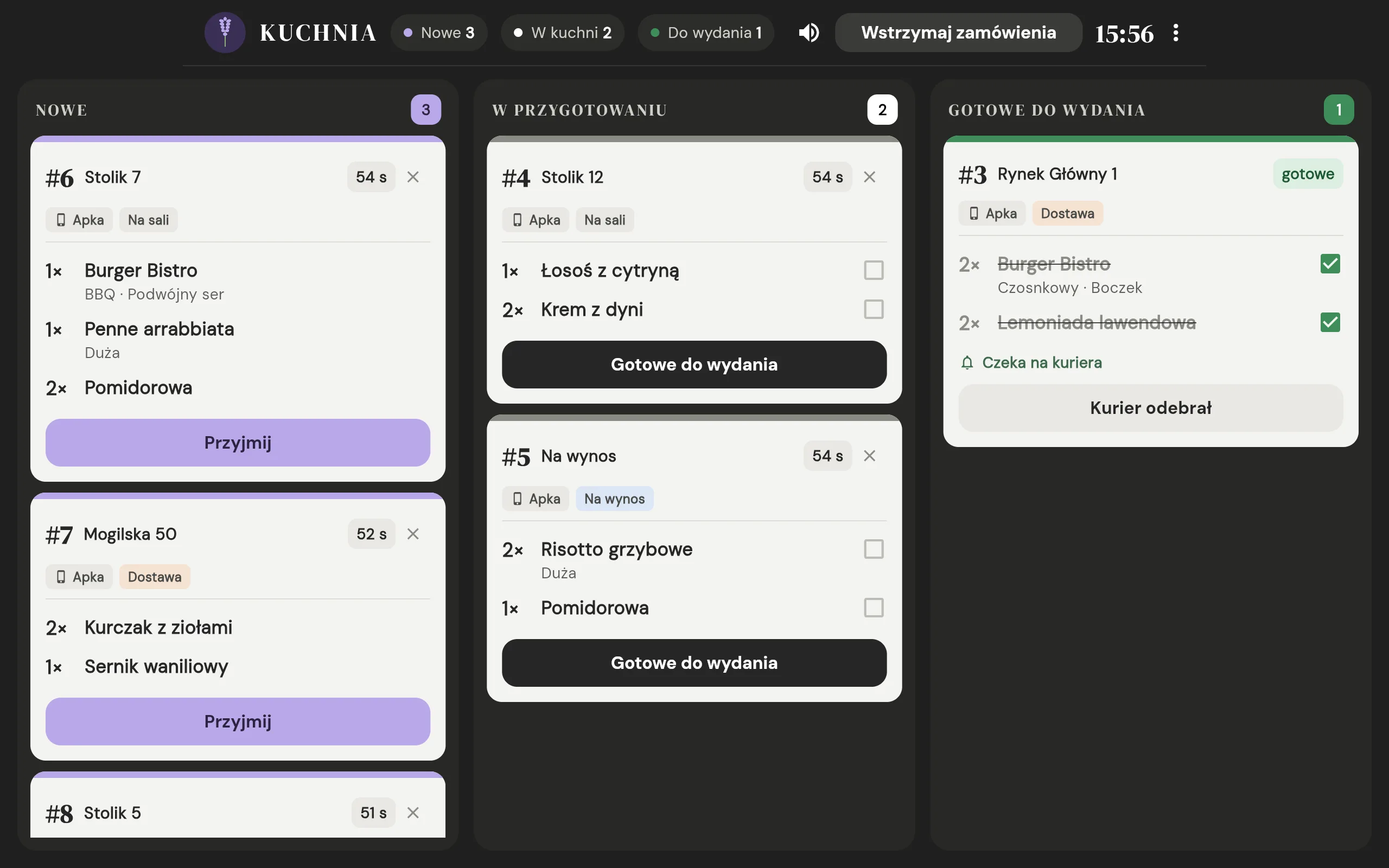
Straight to the kitchen screen
After the call, the order is already in the kitchen. New, in progress, ready: cooks see what to make and tick items off.
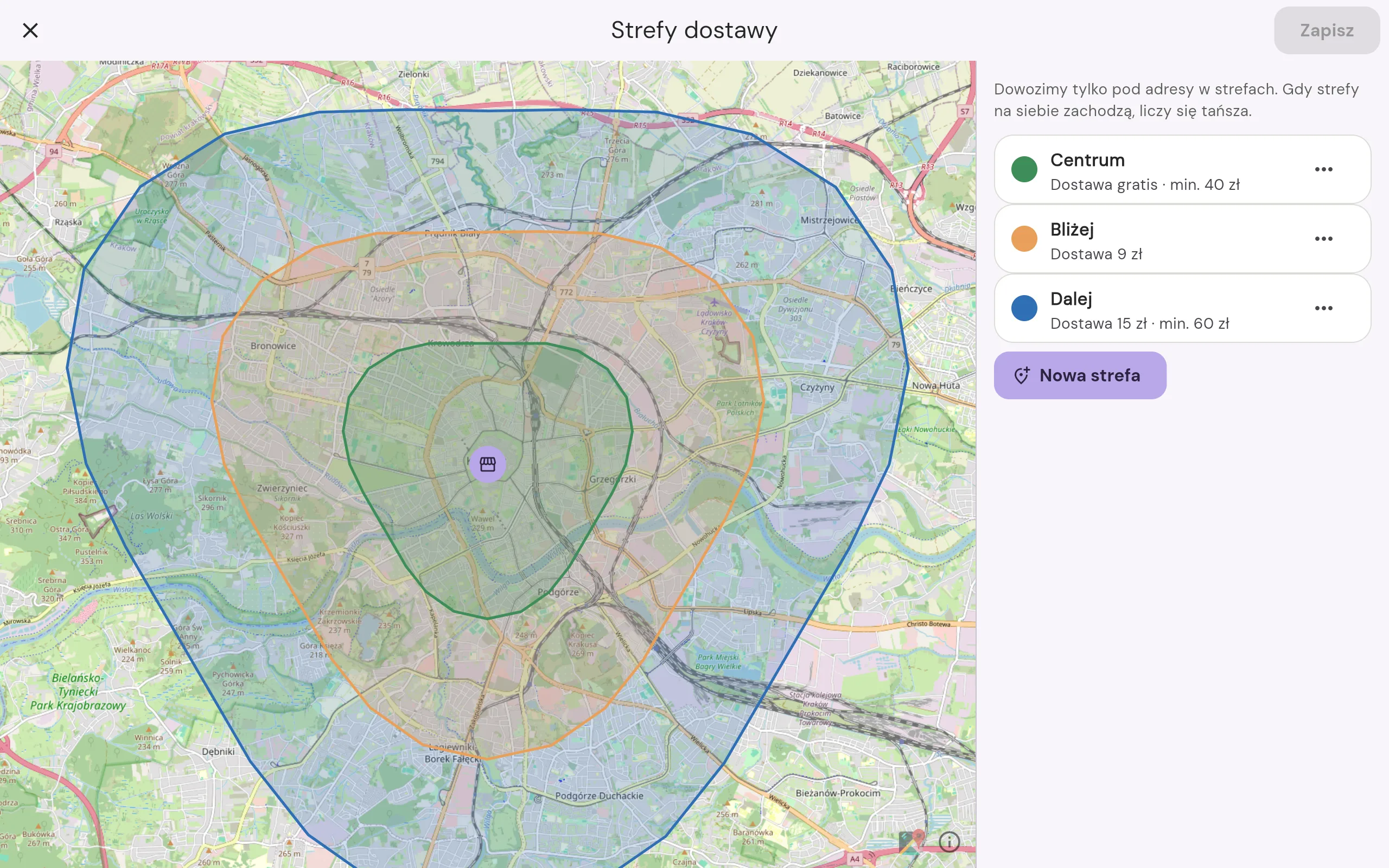
Delivery zones
Areas drawn on a map, each with its own fee and minimum.
Map: © OpenStreetMap contributors
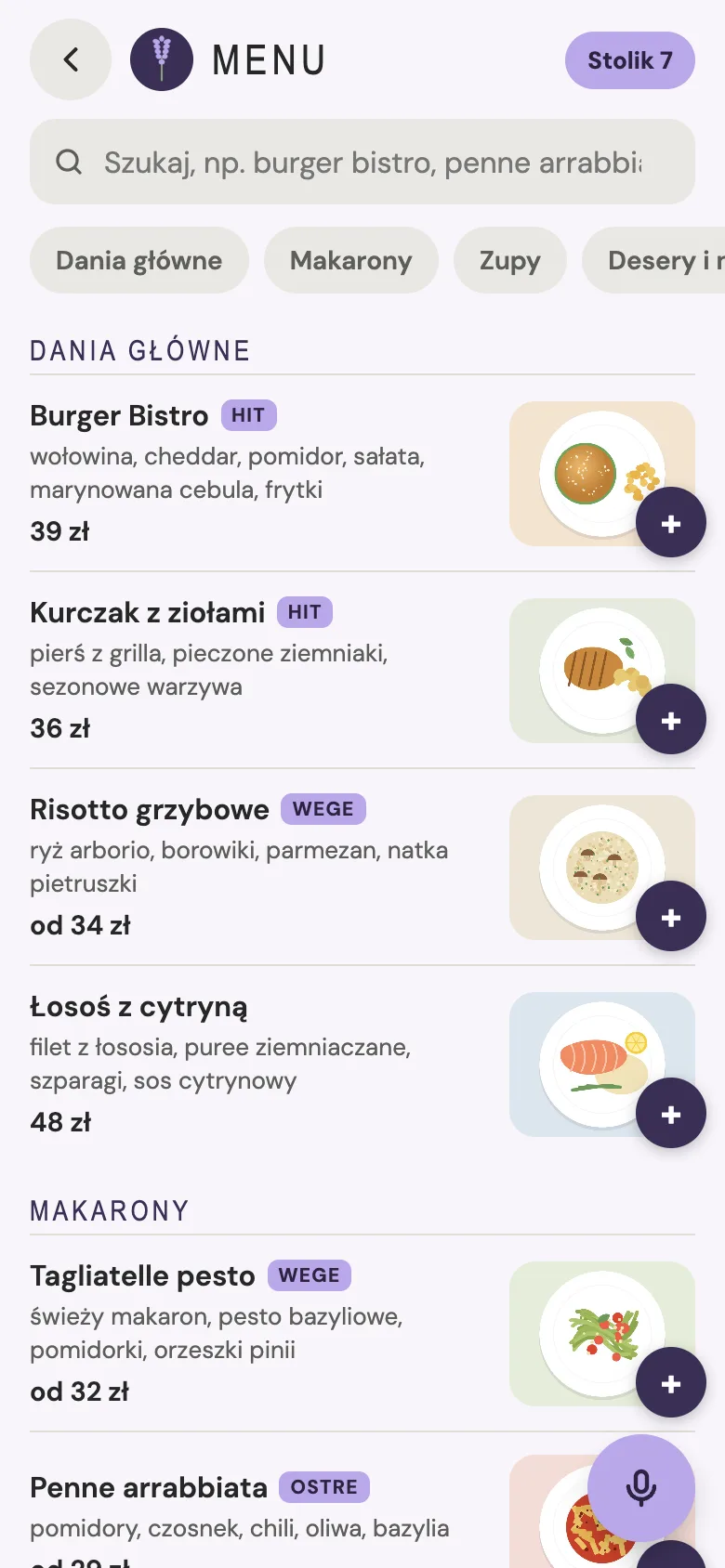
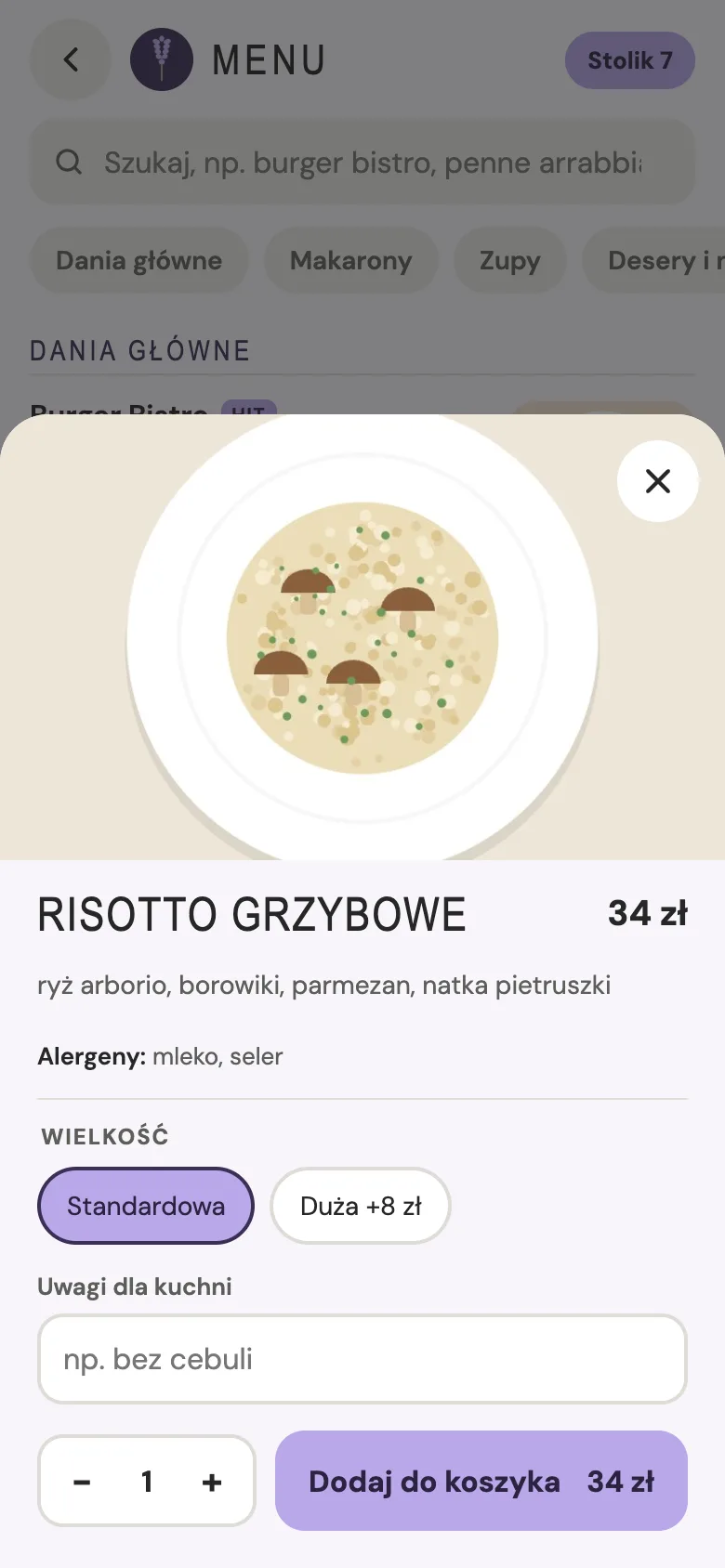
Also: QR code and a menu on the phone
At the table, guests scan a code and talk to the same assistant, or pick from a menu with photos and allergens.
The whole system
More than an assistant. Everything a venue needs.
One system for guests, kitchen, owner and couriers, in your restaurant's colors and with your logo.
For customers
A voice conversation with the assistant. At the table, also a QR code and a menu with photos and allergens.
Kitchen
A tablet or computer screen with a new-order alert and simple statuses.
Owner
A panel for phone, tablet and desktop: revenue, orders, waiting times, staff.
Couriers
An app with deliveries and a map. The owner sees who's on the road.
You're in control
You set the rules
Live conversations
Read what guests say to the assistant during the call, and later in the history.
Your menu, your edits
Change names, ingredients, allergens, sizes, extras, photos and prices yourself. Sold out? One switch turns a dish off.
Delivery zones on a map
Draw your areas and set the delivery fee and minimum order. The assistant checks the address and quotes the fee.
Limits against pranks
Call length, calls per day, orders per phone and order value. The assistant ends off-topic calls by itself.
Also: a QR code at the table
Guests in the venue scan a code and talk to the same assistant in the browser, or pick from the menu. The order lands on the same kitchen screen.
Questions
Frequently asked questions
Do customers have to install anything?
No. They just call. At the table, a QR code and a regular browser are enough.
What if the assistant doesn't understand?
It asks until it's sure. Before placing the order it gives the price and asks for confirmation.
Do customers know they're talking to AI?
Yes. The assistant says so at the start of every conversation.
Does MenuTalk connect to my POS?
For now it runs as a separate system with its own kitchen screen. We discuss POS integrations case by case.
Can customers pay online?
Not yet. Today they pay on pickup or to the waiter.
How much does it cost?
We're setting pricing together with the first restaurants. Write to us and we'll share the pilot terms.
Pilot
Try MenuTalk in your restaurant
Tell us a little about your venue. We'll show you how it works and set up your menu.